Paypal
Intro
PayPal is a wallet which offers its consumers the option to pay online. The consumers can fund their wallet or choose to pay with their preconfigured payment method.
Our platform offers you the possibility to easily accept PayPal payments online. When your consumers choose to pay by PayPal, they are redirected to their PayPal account to confirm the order information and payment method. Next, we process the transaction through PayPal and transaction feedback is provided by PayPal. A real-time confirmation message is provided to both you and the consumer which contains the payment status.
Our platform has one of the most extensive integrations with PayPal available and is integrated to PayPal’s Express Checkout interface. You can choose between Express Checkout Shortcut (ECS) or Express Checkout Mark (ECM) as integration options.
Key benefits
- Fraud Prevention: Allows you to use user data for fraud prevention
- Line items: Allows you to include basket items in the transaction
- Direct sale and Authorization/Data Capture
- Re-authorizations
- Void authorizations
- Refunds: Full/Partial refunds on single capture; Full refunds on multiple captures
- Seller protection
Countries & currencies
Supported countries
-
 Afghanistan
-
 Albania
-
 Algeria
-
 American Samoa
-
 Andorra
-
 Angola
-
 Anguilla
-
 Antigua and Barbuda
-
 Argentina
-
 Armenia
-
 Aruba
Aruba
-
 Australia
 Austria
 Azerbaijan
 Bahamas
 Bahrain
 Bangladesh
 Barbados
 Belarus
 Belgium
 Belize
 Benin
Benin
 Bermuda
 Bhutan
 Bolivia
 Bonaire, Saba and Sint Eustatius
 Bosnia and Herzegovina
 Botswana
 Brazil
 Brunei
 Bulgaria
 Burkina Faso
 Burundi
 Cambodia
 Cameroon
 Canada
 Cape Verde
 Cayman Islands
 Central African Republic
 Chad
Chad
 Chile
Chile
 China
China
 Colombia
 Comoros
 Congo (Democratic Republic)
 Congo (Republic)
 Cook Islands
 Costa Rica
 Croatia
 Cyprus
 Czech Republic
 Denmark
 Djibouti
 Dominican Republic
 Dominica
 Ecuador
 Egypt
Egypt
 El Salvador
 Eswatini
 Equatorial Guinea
 Eritrea
 Estonia
 Ethiopia
 Falkland Islands
 Faroe Islands
 Fiji
Fiji
 Finland
 France
 French Guiana
 French Polynesia
 Gabon
Gabon
 Gambia
 Georgia
 Germany
 Ghana
Ghana
 Gibraltar
 Greece
 Greenland
 Grenada
 Guadeloupe
 Guam
Guam
 Guatemala
 Guinea
 Haiti
Haiti
 Honduras
 Hong Kong
 Hungary
 Iceland
 India
India
 Indonesia
 Iraq
Iraq
 Ireland
 Israel
 Italy
Italy
 Ivory Coast
 Jamaica
 Japan
Japan
 Jordan
 Kazakhstan
 Kenya
Kenya
 Kiribati
 Kuwait
 Kyrgyzstan
 Laos
Laos
 Latvia
 Lebanon
 Lesotho
 Liberia
 Libya
Libya
 Liechtenstein
 Lithuania
 Luxembourg
 Macao
Macao
 Macedonia
 Madagascar
 Malawi
 Malaysia
 Maldives
 Mali
Mali
 Malta
Malta
 Marshall Islands
 Martinique
 Mauritania
 Mauritius
 Mexico
 Micronesia
 Moldova
 Monaco
 Mongolia
 Montenegro
 Morocco
 Mozambique
 Myanmar
 Namibia
 Nauru
Nauru
 Nepal
Nepal
 Netherlands Antilles
 Netherlands
 New Caledonia
 New Zealand
 Nicaragua
 Nigeria
 Niger
Niger
 Niue
Niue
 Norfolk Island
 Northern Mariana Islands
 Norway
 Oman
Oman
 Pakistan
 Palau
Palau
 Panama
 Papua New Guinea
 Paraguay
 Peru
Peru
 Philippines
 Poland
 Portugal
 Puerto Rico
 Qatar
Qatar
 Réunion
 Romania
 Russia
 Rwanda
 Saint Helena
 Saint Kitts and Nevis
 Saint Lucia
 Saint Pierre and Miquelon
 Saint Vincent and The Grenadines
 Samoa
Samoa
 San Marino
 São Tomé and Príncipe
 Saudi Arabia
 Senegal
 Serbia
 Seychelles
 Sierra Leone
 Singapore
 Slovakia
 Slovenia
 Solomon Islands
 Somalia
 South Africa
 South Korea
 Spain
Spain
 Sri Lanka
 Sudan
Sudan
 Suriname
 Sweden
 Switzerland
 Taiwan
 Tajikistan
 Tanzania
 Thailand
 Togo
Togo
 Tonga
Tonga
 Trinidad and Tobago
 Tunisia
 Turkmenistan
 Turks and Caicos Islands
 Tuvalu
 Uganda
 Ukraine
 United Arab Emirates
 United Kingdom
 United States
 Uruguay
 Uzbekistan
 Vanuatu
 Vatican City
 Venezuela
 Vietnam
 Virgin Islands (British)
 Virgin Islands (U.S.)
 Yemen
Yemen
 Zambia
 Zimbabwe
Supported currencies
- Australian dollar (AUD)
- Brazilian real (BRL)
- Canadian dollar (CAD)
- Czech koruna (CZK)
- Danish krone (DKK)
- Euro (EUR)
- Hong Kong dollar (HKD)
- Hungarian forint (HUF)
- Israeli new shekel (ILS)
- Japanese yen (JPY)
- Malaysian ringgit (MYR)
- Mexican peso (MXN)
Integration
Redirect your customers to the Paypal payment portal via our Hosted Checkout Page. Find a high level overview in the "Process flows" chapter.
Our platform allows both Express Checkout Mark and Express Checkout Shortcut mode. Depending on the mode, , differences apply:
Express Checkout Mark mode
Add the following properties to a standard CreateHostedCheckout request:
{
   "order": {
      "amountOfMoney": {
         "currencyCode": "EUR",
         "amount": 1000
      }
   },
   "hostedCheckoutSpecificInput": {
      "returnUrl": "https://yourReturnURL.com"
   },
   "redirectPaymentMethodSpecificInput": {
      "paymentProduct840SpecificInput": {
         "isShortcut": false
      },
      "PaymentProductId": "840"
   }
}
Express Checkout Shortcut mode
Add the following properties to a standard CreateHostedCheckout request:
{
   "order": {
      "amountOfMoney": {
         "currencyCode": "EUR",
         "amount": 1000
      }
   },
   "hostedCheckoutSpecificInput": {
      "returnUrl": "https://yourReturnURL.com"
   },
   "redirectPaymentMethodSpecificInput": {
      "paymentProduct840SpecificInput": {
         "isShortcut": true
      },
      "PaymentProductId": "840"
   }
}| Properties | Remarks |
|---|---|
|
redirectPaymentMethodSpecificInput |
paymentProductId: The numeric identifier of the payment method on our platform. Find this id in the "Overview" chapter. It instructs our platform to send your customers directly to the Paypal portal. If left out, our platform sends your customers to the Hosted Checkout Page instead, allowing them to choose this or any other payment method in your account requiresApproval: Set to "false" as this payment method allows only direct sale operations |
|
paymentProduct840SpecificInput.isShortcut |
Defines whether you use Express Shortcut (true) or Checkout Markt (false) |
|
hostedCheckoutSpecificInput.returnUrl |
The URL we redirect your customers to after the payment has been finalised |
Find detailed information about this object and its properties in our CreateHostedCheckoutAPI
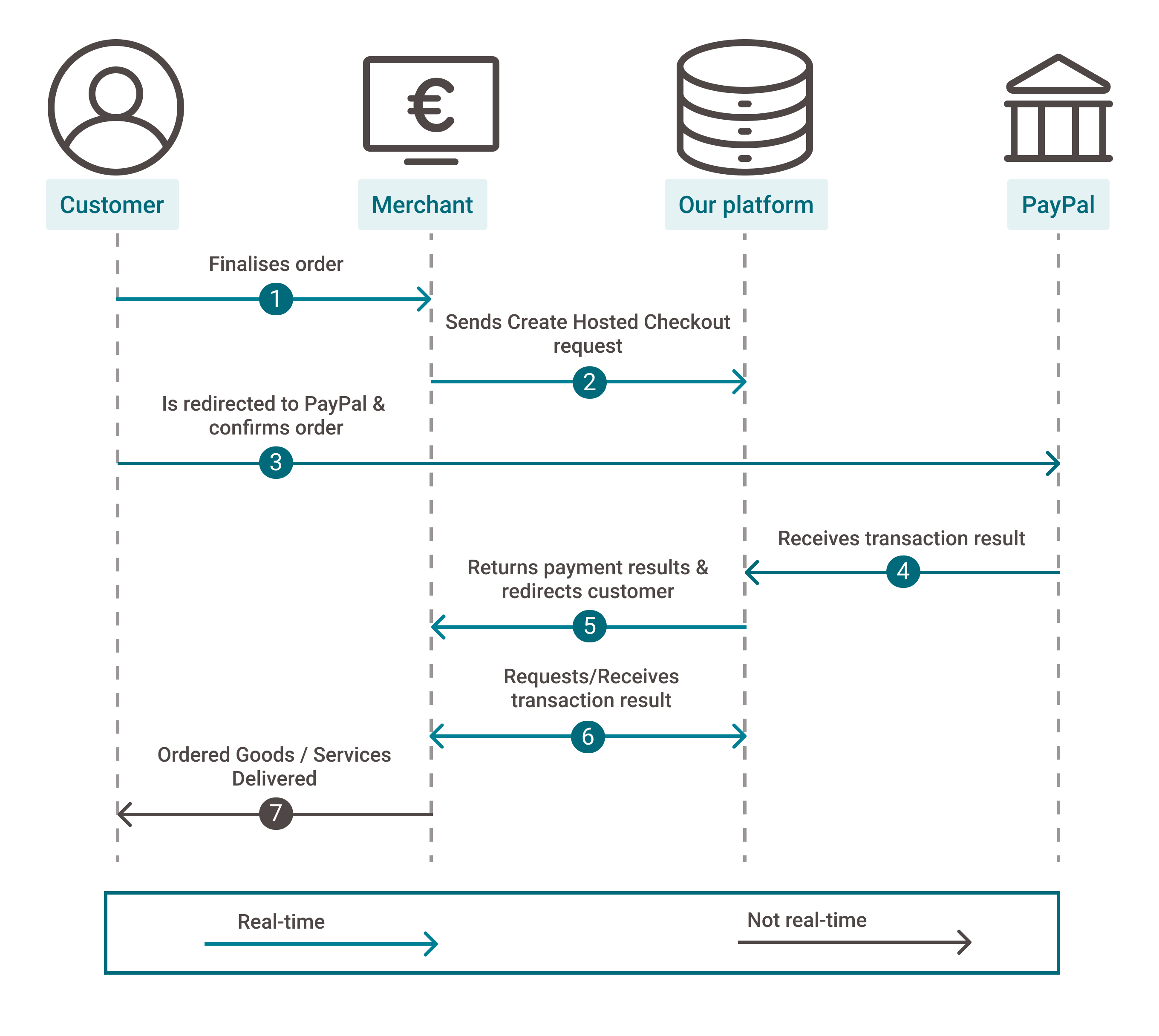
Process flows
- Your customers finalise an order in your shop and select PayPal
- You send one of these CreateHostedCheckout requests (Express Checkout Mark or Express Checkout Shortcut) to our platform
- You redirect your customers via the redirectUrl to the PayPal portal. They confirm the order with their login credentials (email address and password)
- We receive the transaction result
- We redirect your customer to your returnUrl
- You request the transaction result from our platform via GetPayment or receive the result via webhooks
- If the transaction was successful, you can deliver the goods / services
Testing
Refer to our Test cases for test data and detailed instructions
Make sure to use the right endpoint and switch back to the live URL as soon as you have finished your tests
Additional information