Bizum

Intro
Bizum is a Spanish wallet allowing customers to pay with their mobile phone. Once you redirect your customers to the Bizum portal, they confirm the payment with their phone number and a password. Your customers can make their payment in a browser or in the Bizum app, which smooths out the payment experience.
The integration is very easy, as you only have to send three additional parameters along with your request. You can implement this payment method with both integration modes Hosted Checkout Page/Server-to-server.
Einstieg
- Please make sure that this payment method is activated in your Back Office in Configuration > Payment methods.
If this is not the case, contact us - Once Bizum is active in your Back Office, login to the Bizum platform to configure the following in “Configuration data”:
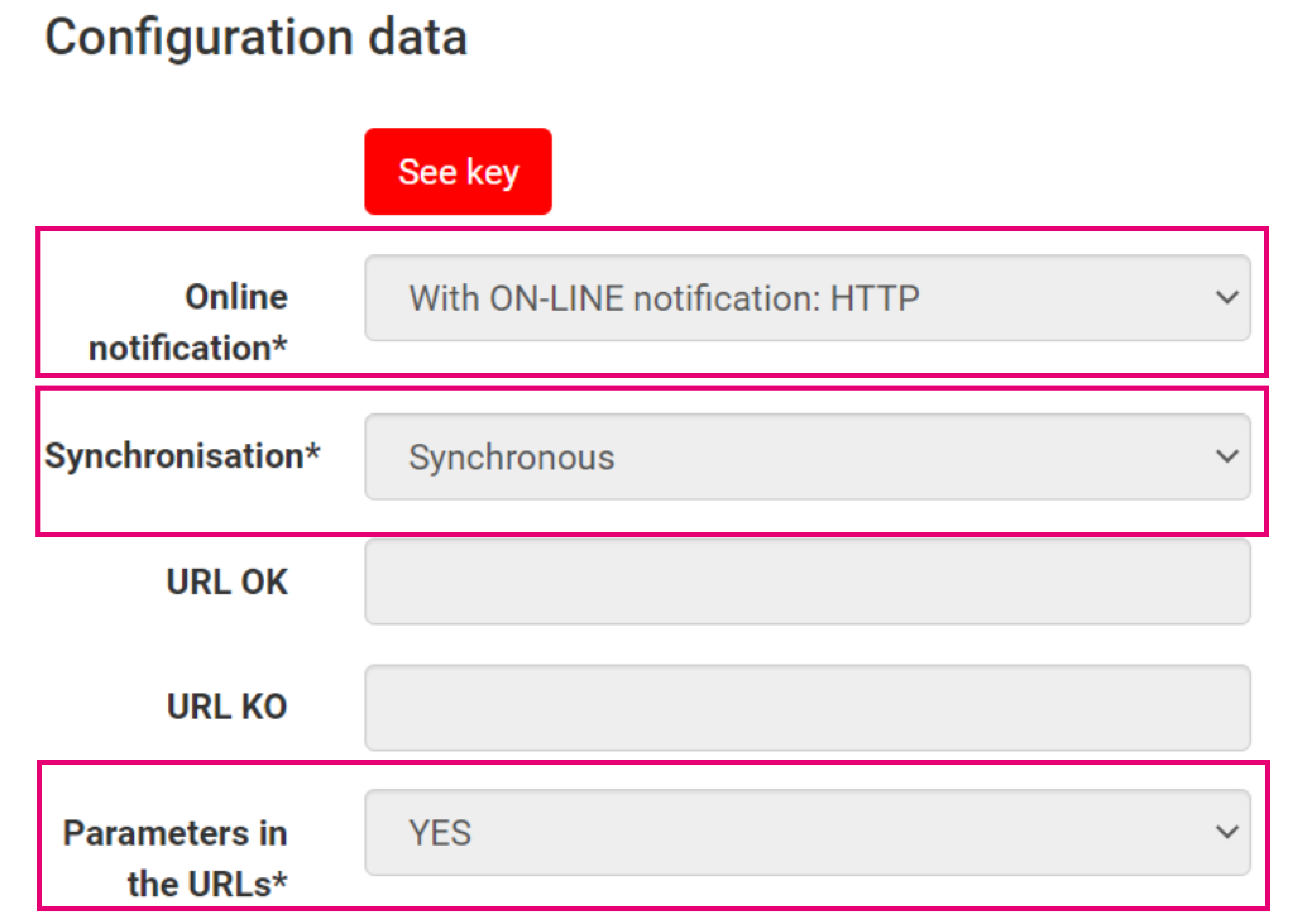
 Spanien
Integration
We offer this payment methods for the following integration modes. Learn in our dedicated guides about their individual differences:
Find a high level overview in the "Zahlungsablauf" chapter.
Hosted Checkout Page/Server-to-server
Add the following properties to a standard CreateHostedCheckout/CreatePayment request:
{
   "order":{
      "amountOfMoney":{
         "currencyCode":"EUR",
         "amount":980
      },
      "customer":{
         "locale":"en_GB"
      }
   },
   "redirectPaymentMethodSpecificInput":{
      "PaymentProductId":5001,
      "RequiresApproval":false,
      "redirectionData":{
         "returnUrl":"https://yoururl.com"
      }
   }
}| Properties | Remarks |
|---|---|
|
redirectPaymentMethodSpecificInput PaymentProductId |
paymentProductId: The numeric identifier of the payment method on our platform. Find this id in the "Überblick" chapter. It instructs our platform to send your customers directly to the Bizum portal. If left out, our platform sends your customers to the Hosted Checkout Page instead, allowing them to choose this or any other payment method in your account returnURL: The URL we redirect your customers to after the payment has been finalised requiresApproval: Set to either "true"/"false" depending on whether you want to process payments in authorisation/direct sale mode |
- If you set requiresApproval to "true", make sure to capture the transaction later via the Merchant Portal or a CapturePayment request. Only then will the transaction have status="CAPTURED" / statusOutput.statusCategory="COMPLETED" / statusOutput.statusCode=9, for which you receive the actual payment for the transaction
- Mind that Bizum supports only one final (partial) capture
Ausführliche Informationen über dieses Objekt und seine Eigenschaften finden Sie in unserer HostedCheckoutAPI/ CreatePaymentAPI
Zahlungsablauf
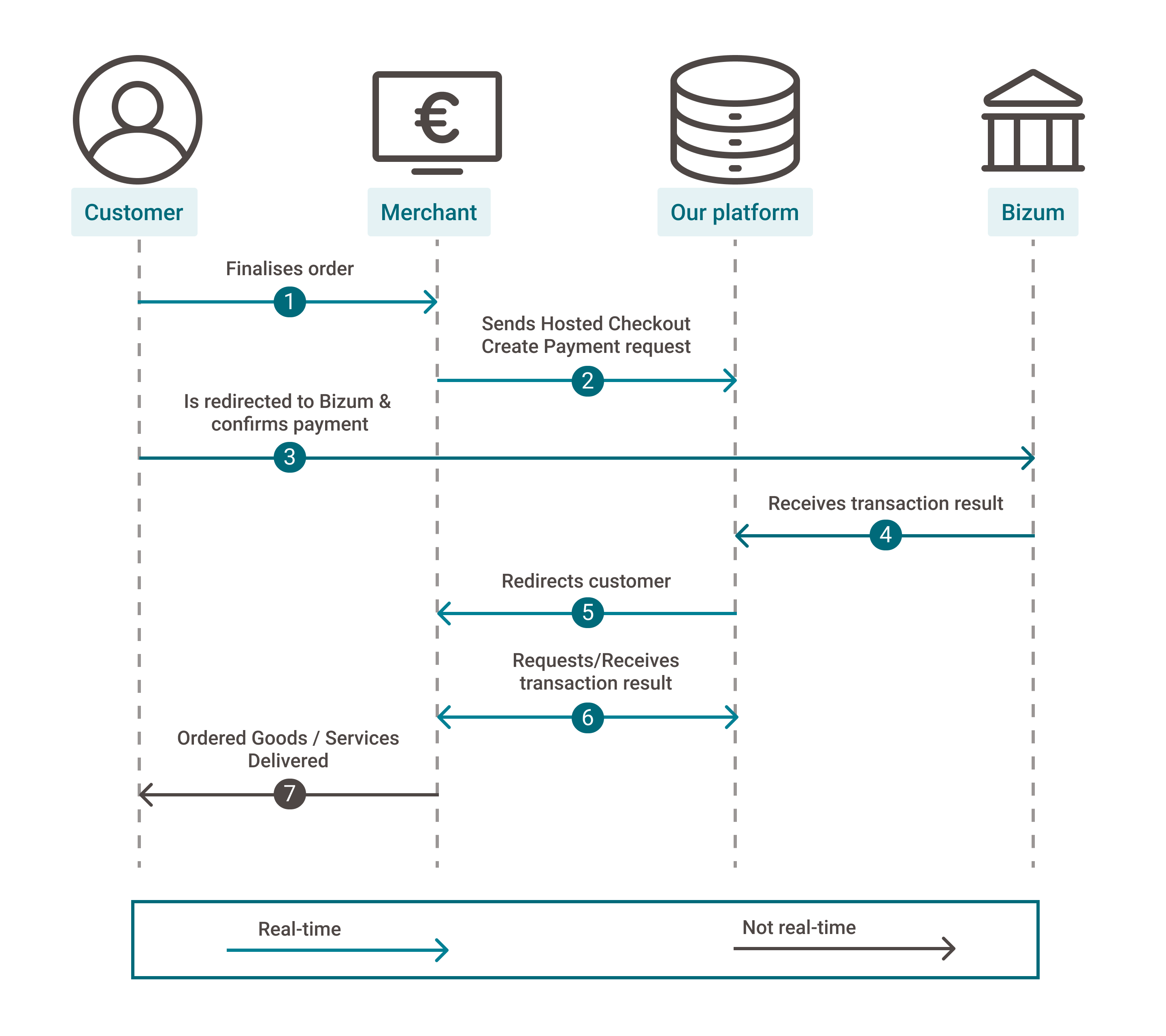
- Every Bizum transaction is linked to an authorisation code which you have to show to your customers during the payment flow
- The Bizum processor Redsys offers you two options for that
1. Redsys displays the authorisation code on the an intermediate page (see step 4a)
2. You retrieve the authorisation code and display it on yourreturnUrl(see step 4b) - Option 1. requires your customers to actively confirm the redirection to your
returnURL. However, some customers might close their browsers instead. This will lead to discrepancies between the actual transaction's status and what your receive in your GetPayment/webhooks request (see step 6) - To avoid such discrepancies and increase conversion rates, we strongly recommend choosing option 2
- Your customers finalise an order in your shop and select Bizum
- You send this CreateHostedCheckout/CreatePayment request to our platform
- You redirect your customers via the redirectUrl (For CreateHostedCheckout requests) or merchantAction.redirectData.redirectURL (For CreatePayment requests). If your customers have the Bizum app installed on their device, it opens the app automatically
Your customers enter their personal data (phone number and password) to confirm the order - Our platform receives the transaction result. Depending on your choice, two scenarios are possible:
a. Bizum redirects your customers to the Redsys intermediate page, displaying the transaction's authorisation code. Your customers confirm the redirection to the returnURL
b. You request the transaction result and the transaction's authorisation code via property redirectPaymentMethodSpecificOutput.authorisationCode from our platform via a GetPayment/webhooks request. Make sure the authorisation code will appear on your returnURL - We redirect your customer to your returnUrl
- You request the transaction result from our platform via GetPayment or receive the result via webhooks
- If the transaction was successful, you can deliver the goods / services
Testdaten
In unseren Testszenarios finden Sie Testdaten und detaillierte Instruktionen.
Stellen Sie sicher, den korrekten Endpunkt anzusteuern und zurück zum Live-Endpunkt zu wechseln, sobald Sie Ihre Tests abgeschlossen haben
Zusätzliche Informationen
You can activate Bizum in the following ways:
- In test with Direct simulator
- In test with end-to-end testing
- In live for real transaction processing