Oney

Intro
Oney is an instalment solution offered by the French acquirer Oney.
Your customers can use Oney to split a payment into many instalments. As a merchant, you will receive the full order amount immediately. Oney will take full responsibility for the instalments and the relationship with the buyer in your stead.
The integration is easy to set up, as you only need to send some additional parameters along with your request.
Offer this payment method in a steadily expanding list of European countries!
Key benefits
- Low PCI requirements
- Easy integration
- Guaranteed payment
- Refunds are possible (Partial/multiple/full)
Boarding
To use Oney in either our test/live environment, follow these steps:
- Sign a contract with Oney and receive activation credentials in return.
- Log in to Worldline Merchant Portal.
- Navigate to Business -> Payment methods.
- Use the credentials you received to activate Oney.
 Belgium
 France
 Germany
 Hungary
 Italy
Italy
 Poland
 Portugal
 Romania
 Spain
Spain
Integration
Redirect your customers to the Oney payment portal via our Hosted Checkout Page. Find a high-level overview in the "Process flows" chapter.
Add the following properties to a standard CreateHostedCheckout request:
{
  "order": {
    "amountOfMoney": {
      "currencyCode": "EUR",
      "amount": 170000
    },
    "customer": {
      "personalInformation": {
        "name": {
          "title": "Mr.",
          "firstName": "Dupont",
          "surname": "Jean"
        },
        "gender": "male",
        "dateOfBirth": "19490917"
      },
      "billingAddress": {
        "street": "bd de Rochechouart",
        "houseNumber": "13",
        "zip": "75009",
        "city": "Paris",
        "state": "Paris",
        "countryCode": "FR"
      },
      "shippingAddress": {
        "street": "bd de Rochechouart",
        "houseNumber": "13",
        "zip": "75009",
        "city": "Paris",
        "state": "Paris",
        "countryCode": "FR"
      },
      "contactDetails": {
        "emailAddress": "jean.dupont@test.com",
        "phoneNumber": "+330175757575"
      }
    },
    "references": {
      "merchantOrderId": "{{TIMESTAMP}}"
    },
    "shoppingCart": {
      "items": [
        {
          "amountOfMoney": {
            "currencyCode": "EUR",
            "amount": 170000
          },
          "orderLineDetails": {
            "productName": "ACME12",
            "discountAmount": 0,
            "lineAmountTotal": 170000,
            "productCode": "ASO45",
            "productPrice": 170000,
            "productType": "Fashion",
            "quantity": 1,
            "taxAmount": 0,
            "unit": "piece"
          }
        }
      ]
    }
  },
  "hostedCheckoutSpecificInput": {
    "locale": "fr_FR"
  },
  "redirectPaymentMethodSpecificInput": {
    "requiresApproval": true,
    "paymentProductId": 5148,
    "paymentOption": "W3122"
  }
}
| Properties | Remarks |
|---|---|
|
order.customer |
If you do not send shippingAddress, your customers will have to provide this data on the Oney portal |
|
references |
- |
|
typeInformation.purchaseType |
- |
|
hostedCheckoutSpecificInput.locale |
- |
|
redirectPaymentMethodSpecificInput |
requiresApproval: Set to "false" as this payment method allows only direct sale operations paymentProductId: The numeric identifier of the payment method on our platform. Find this id in the "Overview" chapter. It instructs our platform to send your customers directly to the Oney portal. If left out, our platform sends your customers to the Hosted Checkout Page instead, allowing them to choose this or any other payment method in your account paymentOption: contains a value to indicate the transaction is split into 3 or 4 instalments. The values for are defined by you and Oney |
Find detailed information about this object and its properties in our CreateHostedCheckoutAPI
Contact Oney to define a minimum/maximum amount limit per transaction
List of available Oney brands
| Brand | paymentProductId |
|---|---|
|
Oney |
5148 |
|
Oney 3x |
5146 |
| Oney 4x | 5147 |
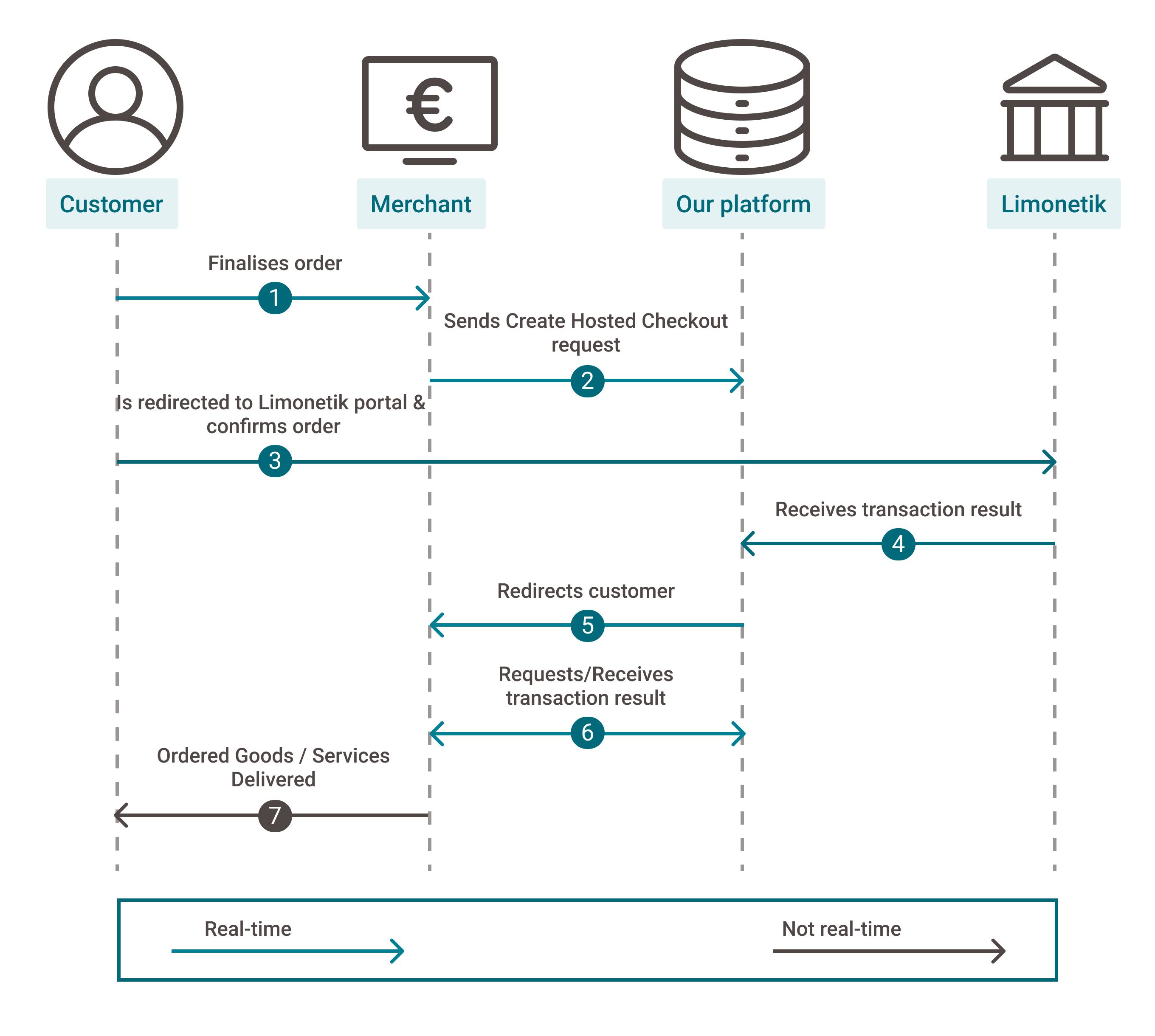
Process flows
- Your customers finalise an order in your shop and select Oney
- You send this CreateHostedCheckout request to our platform
- You redirect your customers via the redirectUrl to the Oney portal. They confirm the order with their personal data
- We receive the transaction result
- We redirect your customer to your returnUrl
- You request the transaction result from our platform via GetPayment or receive the result via webhooks
- If the transaction was successful, you can deliver the goods / services
Testing
Refer to our Test cases for test data and detailed instructions
Make sure to use the right endpoint and switch back to the live URL as soon as you have finished your tests